A Home Assistant frontend custom card for the ha-nfl integration.


- In the HACS UI, click the 3 dots in the upper right
- Click 'Add Custom Repository'
- Fill in the repo url https://github.com/D34DC3N73R/ha-nfl-card and choose 'Lovelace' category.
- install the custom card
- Add the following to your resources
url: /hacsfiles/ha-nfl-card/ha-nfl-card.js
type: module
- Download ha-nfl-card.js
- Copy to www/community/ha-nfl-card/ (make the ha-nfl-card directory)
- Add the following to your resources
url: /hacsfiles/ha-nfl-card/ha-nfl-card.js
type: module
| Name | Description | Default | Required | Values |
|---|---|---|---|---|
entity |
Name of ha-nfl sensor | sensor.nfl |
Yes | Valid sensor |
outline |
Outline team colors (helpful w/ dark themes) | false |
No | true false |
outline_color |
Specifies outline color. | white |
No | CSS color or hex value |
locale |
Specifies the locale to use for date and time. | en-US |
No | A valid locale code. |
disable_odds |
Disables displaying "odds", "over/under", and "Win Probability" | false |
No | true false |
type: 'custom:nfl-card'
entity: sensor.nfl
outline: true
outline_color: deeppink

type: 'custom:nfl-card'
entity: sensor.nfl
outline: true
outline_color: '#ffe500'

type: 'custom:nfl-card'
entity: sensor.nfl
outline: true
outline_color: '#E31837'
disable_odds: true
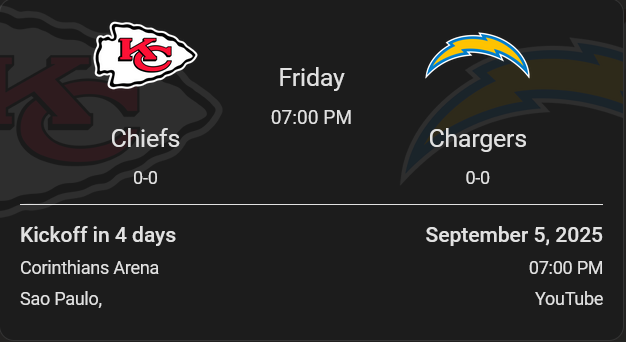
type: 'custom:nfl-card'
entity: sensor.nfl
Where sensor.nfl is the sensor name from the ha-nfl integration.

