Hi,
I do have some suggestions, but my skills in programming with Android Studio are none to zero. Is there someone who can help me?
This is what I want to change/add:
-
When I run the app for the first time, I got a pop-up window asking me to fill in the local IPaddress. When I enter the IPaddress, I can't use the home button. So I have to leave the app and start again. This only happens when click "OK" on the popup. If I choose "CANCEL" and go the the settings screen myself, after entering the Ip-address, I can go back to the main screen. Can this be fixed?
-
When you're not connected, the buttons "Patterns" and "Playlists" should be disabled and enabled once connected..
(the same with pause and stop, when there is no pattern running)
-
The files show in the pattern list should be limited to the following extensions: *.gcode, *.thr and *.seq (see also my point 8, if we want to add a file Config.INF that isn't executable for the sandtable
-
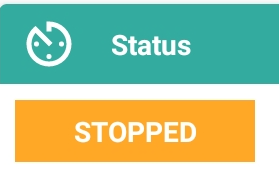
In the main screen, when you use the buttons on top, the status should be changed. like this:
PLAY button -> RUNNING
PAUSE button -> PAUSED
STOP button -> STOPPED
HOMING button -> HOMING (while homing) -> IDLE
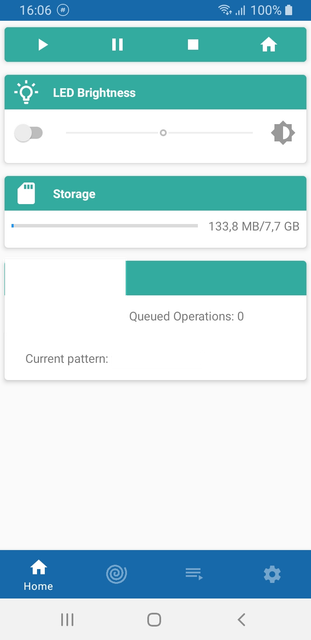
- I also want to see the name of the current pattern in the main screen
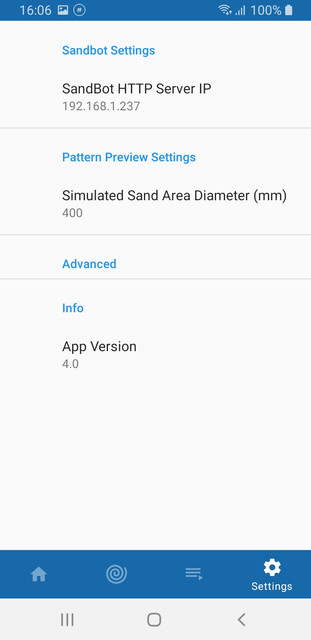
- In the "Settings-screen", I would like to add an item ADVANCED and note the two links /cncUI.html and /sandUI.html that opens in a browser. An item INFO shows the current app-version:
and maybe your SSID (network name) and MAC address too?
-
When you create a playlist and save this, you should return automatically to all the playlist to show the user, the list you just created is actually saved
-
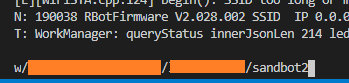
When you set up the SandBot, you have to configure the Wifi with the command w/SSID/PASSWORD/HOSTNAME
Is it possible to create an option so you “scan” with the App for the sand table (search for the hostname) as alternative to enter the IP manually? I know you have to be at least on the same network. I don’t think it is possible the SandBot create his own network (access point) and be used as an access point to enter the right information (another network and password) or am I wrong?
For this last suggestion, I also have an alternative in my mind: Right now, the netword SSID and Pasword are hard coded in the feather board. Maybe it's possible to add an file "CONFIG.INF" to the SD card with the following information:
CONFIG.INF
WIFI-SETTINGS:
SSID: my_networkname
Password: xxxx
For this option, a modification to the firmware is necessary.

Hi,
I do have some suggestions, but my skills in programming with Android Studio are none to zero. Is there someone who can help me?
This is what I want to change/add:
When I run the app for the first time, I got a pop-up window asking me to fill in the local IPaddress. When I enter the IPaddress, I can't use the home button. So I have to leave the app and start again. This only happens when click "OK" on the popup. If I choose "CANCEL" and go the the settings screen myself, after entering the Ip-address, I can go back to the main screen. Can this be fixed?
When you're not connected, the buttons "Patterns" and "Playlists" should be disabled and enabled once connected..
(the same with pause and stop, when there is no pattern running)
The files show in the pattern list should be limited to the following extensions: *.gcode, *.thr and *.seq (see also my point 8, if we want to add a file Config.INF that isn't executable for the sandtable
In the main screen, when you use the buttons on top, the status should be changed. like this:
PLAY button -> RUNNING
PAUSE button -> PAUSED
STOP button -> STOPPED
HOMING button -> HOMING (while homing) -> IDLE

and maybe your SSID (network name) and MAC address too?When you create a playlist and save this, you should return automatically to all the playlist to show the user, the list you just created is actually saved
When you set up the SandBot, you have to configure the Wifi with the command w/SSID/PASSWORD/HOSTNAME
Is it possible to create an option so you “scan” with the App for the sand table (search for the hostname) as alternative to enter the IP manually? I know you have to be at least on the same network. I don’t think it is possible the SandBot create his own network (access point) and be used as an access point to enter the right information (another network and password) or am I wrong?
For this last suggestion, I also have an alternative in my mind: Right now, the netword SSID and Pasword are hard coded in the feather board. Maybe it's possible to add an file "CONFIG.INF" to the SD card with the following information:
CONFIG.INF
For this option, a modification to the firmware is necessary.