 React Hook Form
Trouble creating radio buttons inside a controller, the value I want simply disappear from the form #1885


-
|
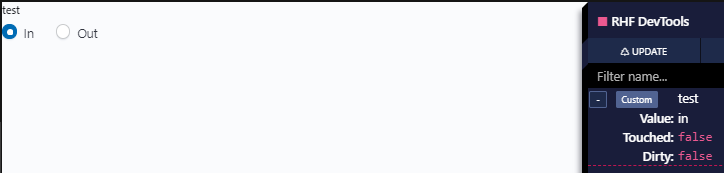
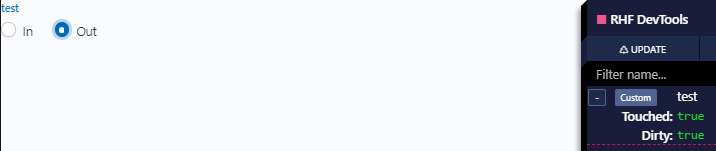
Hello, I feel dumb asking this but I've been pulling my hair out for hours on this and this is last resort. I searched a lot but I could not find a case similar to mine where I have to create several Controllers to track one value. Maybe my example could be simpler but this version works mostly fine, my only trouble is that the value simply disappear when I set it. Actually, it disappears as soon as I click on my second option and I have no idea why.
https://codesandbox.io/embed/distracted-darkness-x6wlo?fontsize=14&hidenavigation=1&theme=dark I must use Eui and they don't expose ref or inputRef to make it simpler. I feel the solution must be completely idiotic but I simply can't find it :( I love everything I see from react-hook-form otherwise, I'm glad I started using it, thanks for the great work! |
Beta Was this translation helpful? Give feedback.
Replies: 3 comments 3 replies

-
|
Take a quick glance, you are using multiple |
Beta Was this translation helpful? Give feedback.
-
|
I tried looking for MUI in all the different sandboxes but could not find the example you were talking about... I did give a try at putting all the radio buttons in only one controller in this sandbox : But the value still gets removed as soon as I interact with the buttons. Even when commenting the SetValue, the issue persists. About the multiple controllers, I think I got mislead by this note in the custom register documentation :
Finally, I don't really understand how onChange({[e]}=>change(e)) actually work, how does this code knows that "e" is my radio buttons? Does Controller kind of intercepts all inputs it wraps? |
Beta Was this translation helpful? Give feedback.

-
|
That note is for isn't there a radio group example? |

Beta Was this translation helpful? Give feedback.

-
|
can you please take a look #2007 |
Beta Was this translation helpful? Give feedback.
-
|
Alright, found the solution. The problem was that I am fricking dumb. https://codesandbox.io/s/quiet-cloud-zo2jk I forgot to set the value of my radios to value={opt.id} and I did not use the correct onChange. I thought I HAD to use it on the Controller, but it is not required at all. Sorry for the loss of time. And thanks again for the awesome library! |
Beta Was this translation helpful? Give feedback.
-
|
Nah, you are not dumb. <3 Awesome you figure this out. happy coding. |
Beta Was this translation helpful? Give feedback.


Alright, found the solution. The problem was that I am fricking dumb.
https://codesandbox.io/s/quiet-cloud-zo2jk
I forgot to set the value of my radios to value={opt.id} and I did not use the correct onChange. I thought I HAD to use it on the Controller, but it is not required at all.
Sorry for the loss of time. And thanks again for the awesome library!