Releases: ArroyoSystems/arroyo
v0.15.0

These release notes are also available on the Arroyo Blog
This release contains many improvements and fixes from running Arroyo at scale to power Cloudflare Pipelines. There are also some exciting new features, in particular complete support for writing Apache Iceberg tables.
Arroyo is a community project, and we're greatful to all of our contributors. We particularly want to welcome those who made their first contributions in this release:
- @Vinamra7 made their first contribution in #870
- @meirdev made their first contribution in #880
- @pancernik made their first contribution in #885
- @cmackenzie1 made their first contribution in #895
- @janekhaertter made their first contribution in #901
- @hhoughgg made their first contribution in #898
- @askvinni made their first contribution in #923
- @migsk made their first contribution in #962
Features
Iceberg
New in Arroyo 0.15 is the ability to write to Apache Iceberg tables via the new Iceberg Sink. Iceberg is a table format, which provides database-like semantics on top of data files stored in object storage.
The Iceberg Sink builds on our existing FileSystem Sink, which is uniquely capable of writing large Parquet files (supporting efficient querying) to object storage, exactly-once, while still maintaining frequent checkpoints.
On top of the existing Parquet-writing infrastructure, the Iceberg Sink adds a two-phase commit protocol for committing to Iceberg tables, extending exactly-once semantics to the catalog.
Iceberg support is launching with support for most REST catalogs including S3 Tables, Snowflake Polaris, Lakekeeper, and of course R2 Data Catalog, Cloudflare's managed Iceberg Catalog built on R2 Object Storage.
What does this look like? Here's an example of a query that will write to an R2 Data Catalog table:
create table impulse with (
    connector = 'impulse',
    event_rate = 100
);

create table sink (
    id INT,
    ts TIMESTAMP(6) NOT NULL,
    count INT
) with (
    connector = 'iceberg',
    'catalog.type' = 'rest',
    'catalog.rest.url' = 'https://catalog.cloudflarestorage.com/bddda7b15979aaad1875d7a1643c463a/my-bucket',
    'catalog.warehouse' = 'bddda7b15979aaad1875d7a1643c463a_my-bucket',
    type = 'sink',
    table_name = 'events',
    format = 'parquet',
    'rolling_policy.interval' = interval '30 seconds'
) PARTITIONED BY (
    bucket(id, 4),
    hour(ts)
);

insert into sink
select subtask_index, row_time(), counter
from impulse;
This example also demonstrates the new PARTITIONED BY syntax for expressing partitioning schemas for Iceberg tables. We support all Iceberg partition transforms like day, hour, bucket, and truncate.
See the Iceberg sink docs for full details on how to use it.
- Iceberg sink by @mwylde in #929
- Don't write out partition path for iceberg by @mwylde in #939
- Reduce iceberg commit overhead by @mwylde in #942
- Fixes for writing Iceberg data with deeply nested arrays and structs by @mwylde in #947
- Iceberg partitioning by @mwylde in #957
Improved Checkpoint Details
Arroyo checkpoints its state periodically in order to achieve fault tolerance. That is to say: crashing shouldn't cause us to lose data (or, when using transactional sources and sinks, to duplicate data).
Checkpointing in a distributed dataflow system is complicated. We use a variation of an algorithm designed back in the 80s by distributed systems GOAT Leslie Lamport, called Chandy-Lamport snapshots.
We've previously written in more detail about how this works, but the gist is: we need to propagate a checkpointing signal through the dataflow graph, each operator needs to respond to it by performing several steps and ultimately uploading its state to object storage, then we need to write some global metadata and possibly perform two-phase commit.
Any of these steps can encounter issues or performance problems, and it's often useful to be able to dig into the timings of individual steps to diagnose overall slow checkpointing.
We've long had some basic tools in the Web UI for this, but in 0.15 we've made them much better. It looks like this:
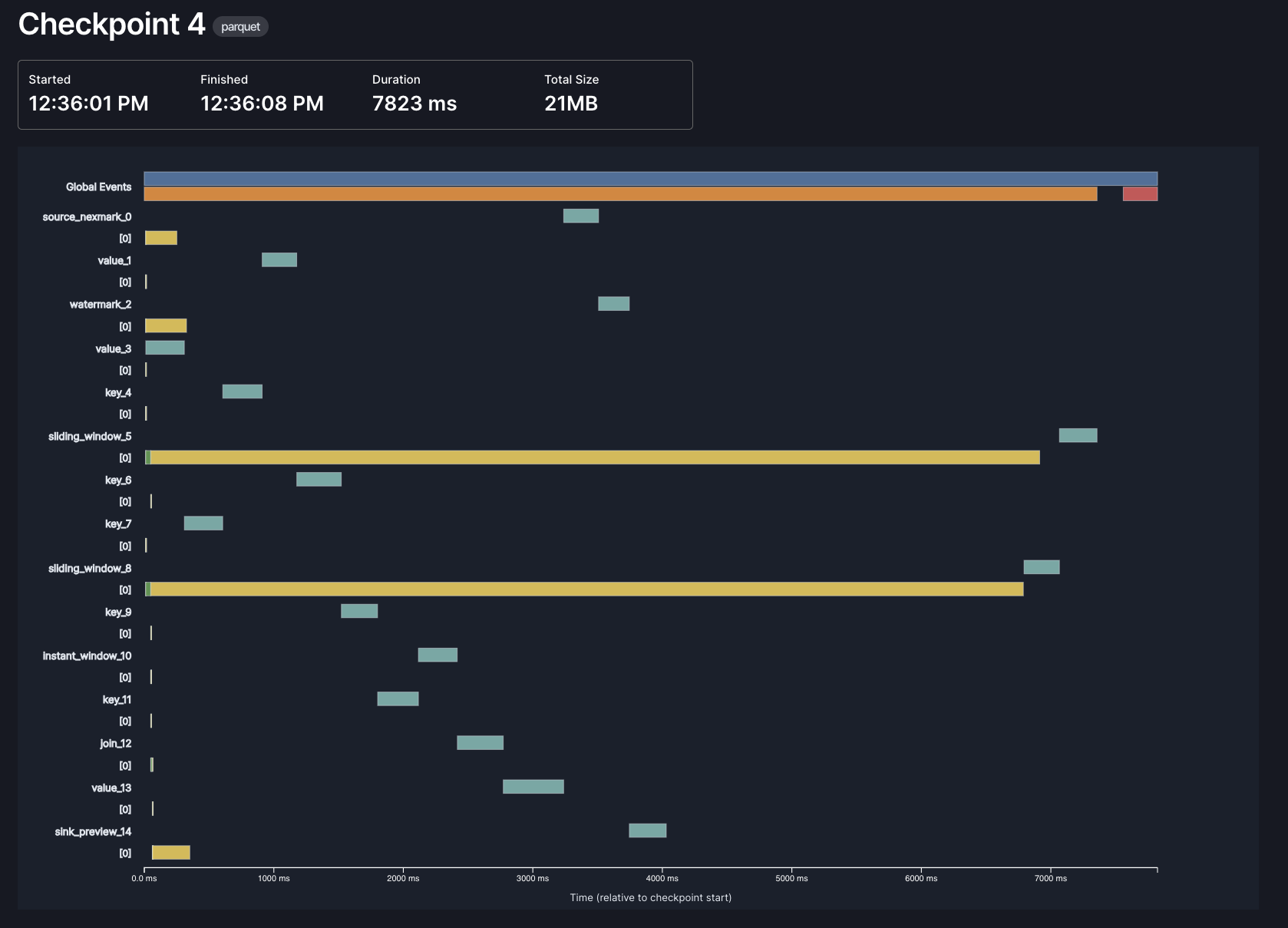
Each bar represents a different phase of checkpointing, in one of three contexts: global, per-operator, and per-subtask. In this example, most of the time in checkpointing is spent by the async phase of our window operators (the long yellow lines), which makes sense: those are the operators that need to store the most state, and the async phase is when we actually upload data to object storage.
Thanks to @hhough who contributed significantly towards this effort!
- Better understand checkpoint timing by @hhoughgg in #898
- Better checkpoint metrics by @mwylde in #941
- Improve checkpoint timing metrics by @mwylde in #903
SQL
We've made several improvements to our SQL support in Arroyo 0.15.0.
New functions
We've upgraded our SQL expression engine to DataFusion 48, which brings along a number of new SQL functions:
- greatest
- least
- overlay
- array_max / list_max
- array_overlap
- array_any_value
- array_has_all
- array_has_any
- array_intersect
- array_max
- array_ndims
- array_pop_back
- array_pop_front
- array_prepend
- array_remove_all
- array_remove_n
- array_replace
- array_replace_all
- array_slice
- union_extract
- union_tag
row_time
In addition to the new standard SQL functions, we've added a special new row_time function which returns the event time of the current row. This can be particularly useful when used as a partitioning key, as can be seen in the previous Iceberg partitioning example.
Thanks @RatulDawar for this great contribution!
- Add row_time UDF by @RatulDawar in #858
Decimal Type
We've added support for the Decimal SQL type in 0.15, backed by the Decimal128 Arrow type. You can now use precise, fixed-point arithmetic in your SQL queries, useful for financial, scientific, or other use cases requiring exact numeric accuracy.
A Decimal type is defined like this:
CREATE TABLE ORDERS (
  PRICE DECIMAL(precision, scale),
  ...
)
It takes two arguments:
- precision is the total number of significant digits (both before and after the decimal point)
- scale is the number of digits after the decimal point
For example, DECIMAL(10, 2) supports values like 12345678.90, while DECIMAL(5, 3) supports values like 12.345.
We've also added support for serializing DECIMAL into JSON in several formats, which can be configured via the json.decimal_encoding option:
number: JSON number, which may lose precision depending on the JSON library that's consuming the valuestring: renders as a full-precision string representationbytes: encodes as a two's-complement, big-endian unscaled integer binary array, as base64
Note that due to SQL's promotion rules, certain calculations (like those involving BIGINT UNSIGNED and BIGINT) may unexpectedly produce values as DECIMAL, as that may be the only way to fully represent the result.
Cloudflare R2 support
This release has added complete support for Cloudflare R2 object storage, for both checkpoints and in the FileSystem sink.
R2 can be configured in any part of the system that takes object-store paths, via a new URL scheme:
r2://{account_id}@{bucket_name}/{prefix}
or via an endpoint URL:
https://{bucket}.{account_id}.{jurisdiction}.r2.cloudflarestorage.com/{path}
Why did this require custom work...
v0.14.1
v0.14.1 is a patch release containing several fixes on top of 0.14.0. It is a drop-in replacement for clusters running 0.14.0 and is recommended for all users.
- Support binding worker address to loopback for local dev by @mwylde in #869
- Improve the error message when writing to a non-updating format by @mwylde in #874
- Update Datafusion sha to 987c06a5 to pull in fix to encoding by @mwylde in #884
- Fix: Support Vec<&str> args in UDAFs by @Vinamra7 (#870)
- Fix regression that caused all sink inputs to be shuffled by @mwylde in #890
- Fix race condition in control loop that could cause pipeline starts to be ignored by @mwylde in #892
Full Changelog: v0.14.0...v0.14.1
Contributors


Assets 10
v0.14.0
These release notes are also available on the Arroyo Blog
This release includes several major new features (including lookup joins and more powerful updating support), new convenient syntax for event time, watermarks, and source metadata, support for struct types in DDL, among many other improvements and fixes.
Features
Lookup joins
In streaming applications, joins are typically performed between two streaming sources—for example, between a Kafka stream of orders and one of transactions. But sometimes we have a smallish, static-ish dataset that we want to use to enrich a stream. For example, a SaaS company may be ingesting a stream of events from each of their customers, which they need to enrich with information from a customers table.
Lookup joins are a new feature in Arroyo 0.14 that supports that pattern. It allows you express a query in another system that will be performed based on incoming keys from a streaming query.
In this first release, Redis (GET) is supported as the query system; we will be adding support for other databases like Postgres and MySQL as well.
What does this look like? Let's take an example. First, we need to define the table for the lookup source, which we call a TEMPORARY TABLE, as its not materialized:
CREATE TEMPORARY TABLE customers (
    -- For Redis lookup tables, it's required that there be a single
    -- METADATA FROM 'key' marked as PRIMARY KEY, as Redis only supports
    -- efficient lookups by key
    customer_id TEXT METADATA FROM 'key' PRIMARY KEY,
    name TEXT,
    plan TEXT
) with (
    connector = 'redis',
    address = 'redis://localhost:6379',
    format = 'json',
    'lookup.cache.max_bytes' = 1000000,
    'lookup.cache.ttl' = interval '5 seconds'
);
The lookup.cache.max_bytes and lookup.cache.ttl are optional arguments that control the behavior of the built-in cache, which avoids the need to query the same keys over and over again.
Once we've defined the table we can use it in queries with either JOIN or LEFT JOIN:
CREATE TABLE events (
    event_id TEXT,
    timestamp TIMESTAMP,
    customer_id TEXT,
    event_type TEXT
) WITH (
    connector = 'kafka',
    topic = 'events',
    type = 'source',
    format = 'json',
    bootstrap_servers = 'broker:9092'
);

SELECT  e.event_id,  e.timestamp,  c.name, c.plan
FROM  events e
LEFT JOIN customers c
ON concat('customer.', e.customer_id) = c.customer_id
WHERE c.plan = 'Premium';
See the full Lookup Join docs, and the Redis connector docs.
Nested updates
Arroyo 0.14 ships with much more powerful support for updating SQL, a type of streaming SQL based around incrementally computing SQL queries (for more on the different types of streaming SQL, see this blog post).
Previously, we supported a single updating aggregate for a query, for example
-- count of each user
SELECT user_id, count(*)
FROM events
GROUP BY user_id;
We now support much more sophisticated queries that combine (or "nest") multiple aggregates, like
-- how many users have count above 5?
SELECT count(*) FROM (
    SELECT user_id
    FROM events
    GROUP BY user_id
    HAVING count(*) > 5
)
Another consequence of this is that it's now possible to write sophisticated aggregating queries over incoming updating data, for example from a RDBMS changefeed via Debezium. For example, this query consumes from the changefeed of an orders table (e.g., from Postgres) and computes how many orders are currently in the "pending" state, updating incrementally with every addition and change in the underlying table:
CREATE TABLE orders (
    id INT PRIMARY KEY,
    product_name TEXT,
    price FLOAT,
    order_date TIMESTAMP,
    status TEXT
) WITH (
    connector = 'kafka',
    bootstrap_servers = 'localhost:9092',
    topic = 'orders',
    format = 'debezium_json',
    type = 'source'
);

select count(*)
from orders
where status = 'PENDING';
Currently, nesting is only supported for aggregates, but will be extended to joins in the next release.
Struct types
Arroyo has always supported struct types (also known as composite types), but it's been a bit hard to actually use them. In particular, while you could define tables with struct types using JSON schema, Avro, or Protobuf, it wasn't possible to define them inline in DDL (CREATE TABLE).
In 0.14, we're addressing that by introducing struct type syntax, inspired by Bigquery's. It looks like this:
CREATE TABLE events (
    event_id INT,
    name TEXT,
    properties STRUCT <
      user_id TEXT,
      timings INT[],
      name STRUCT <
        first TEXT,
        last TEXT
      >
    >
) with (
    connector = 'sse',
    format = 'json',
    endpoint = 'http://example.com'
)
This will deserialize JSON with the same nested structure, for example:
{
  "event_id": 1,
  "name": "user_signup",
  "properties": {
    "user_id": "abc123",
    "timings": [100, 200, 300],
    "name": {
      "first": "Alice",
      "last": "Smith"
    }
  }
}Syntax!
We've finally gone and done it. We've taken Postgres syntax as far as will can go. In 0.14, we're finally embracing custom syntax for streaming-specific concepts, with a custom SQL parser. This enabled the struct syntax in the previous section, and gives us much more flexibility to provide good UX for our SQL dialect.
In addition to STRUCT<>, we're also introducing three other changes in 0.14, for watermarks, metadata, and WITH arguments. We encourage users to switch to these new forms, as the old forms will be dropped in the next release and will produce a warning in the meantime.
Event time and watermark
Event time and watermarks are core to Arroyo's dataflow semantics. These allow users to specify (1) a field of the data that represents the actual, real-world time an event occurred, and (2) how we should generate watermarks based on that time.
Previously users expressed this via generated fields and WITH arguments:
CREATE TABLE logs (
  timestamp TIMESTAMP NOT NULL,
  id INT,
  watermark TIMESTAMP GENERATED ALWAYS AS (timestamp - INTERVAL '5 seconds') STORED
) WITH (
  event_time_field = 'timestamp',
  watermark_field = 'watermark',
  ...
)
which was verbose and required adding potentially unwanted fields to the schema. In 0.14, this can instead be written using a new WATERMARK FOR syntax, following the structure:
WATERMARK FOR fieldname [AS watermark_expr]
For example:
CREATE TABLE logs (
  timestamp TIMESTAMP NOT NULL,
  id INT,
  WATERMARK FOR timestamp AS timestamp - INTERVAL '5 seconds'
) WITH (
  ...
)
See the watermark docs for more details.
Metadata
In 0.13, we introduced support for source metadata, the ability to inject non-data fields into a source table, like a Kafka offset or MQTT topic. Defining metadata columns required the somewhat unfortunate approach of defining a virtual field with a magic metadata UDF, like
create table users (
    id TEXT,
    name TEXT,
    offset BIGINT GENERATED ALWAYS AS (metadata('offset_id')) STORED,
    partition INT GENERATED ALWAYS AS (metadata('partition')) STORED
) with (
    connector = 'kafka',
    ...
);
In 0.14, this has been replaced with a more obvious METADATA FROM syntax:
offset BIGINT METADATA FROM 'offset_id',
partition INT METADATA FROM 'partition'
Typed WITH options
Arroyo connector tables are configured via WITH options, key-value pairs that control the behavior of the connector. Previously, values were required to be SQL strings. We now support richer types, like booleans, numbers, field-references, and intervals:
CREATE TABLE files (
    ...
) WITH (
    connector = 'filesystem',
    rollover_seconds = 60
    time_partition_pattern = '%Y/%m/%d/%H',
    'json.include_schema' = true,
    'event_time_field' = datetime,
    'flush_interval' = interval '5' seconds
);- Introduce METADATA and WATERMARK syntax by
@mwylde in
#837 - Support typed SQL opts in with clause by @mwylde
in #825
Sink shuffles
The FileSystem sink allows users to partition their data by a key. For example, in a data ingestion pipeline this might be an event type, or a customer id; when ingesting into a data lake, partitioning by key can improve query performance by reducing the number of files that need to be read.
However, this advantage is diminished somewhat when running a highly-parallelized Arroyo pipeline, as each parallel subtask will write its own set of files for each partition key. For example, if we have parallelism of 32 and 100 distinct event types, we'd be writing 3200 files for every flush interval.
Arroyo 0.14 introduces a new option for the FileSystem sink: `shuffle_by_par...
Contributors
Assets 10
v0.13.1
v0.13.1 is a patch release containing several fixes on top of 0.13.0. It is a drop-in replacement for clusters running 0.13.0 and is recommended for all users.
- Fix regression with delta writes of invariant columns by @mwylde in #816
- Address log message spew when committing multiple sinks by @mwylde in #817
- Correctly handle AWS token refreshes for Delta by @mwylde in #819
Full Changelog: v0.13.0...v0.13.1
Contributors
Assets 10
v0.13.0
These release notes can also view viewed on the Arroyo blog
This release introduces support for metadata from sources, a new RabbitMQ connector, improved CDC support, IAM auth for Kafka, a more efficient core dataflow, among many other improvements.
Arroyo is a community project, and we're very grateful to all of our contributors. We are particularly excited to welcome four new contributors to the project in this release:
- @tiagogcampos made their first contribution in #735
- @emef made their first contribution in #759
- @vaibhawvipul made their first contribution in #765
- @ecarrara made their first contribution in #798
Thanks to all of our contributors for this release:
Features
Source metadata
In Arroyo, users write SQL DDL statements (CREATE TABLE) to define the schema of incoming data from sources. But the underlying data in those sources is in some format or encoding, like JSON or Avro. Arroyo deserializes the data, and maps the fields in the data into the SQL schema so it can be used in queries.
So that works for data. But there are other bits of context that users might want to be able to use as well, not part of the actual data of the message but related metadata. For example, in Kafka a user might want to access the partition of a message, or the offset, or timestamp.
Previously this was not possible, but in 0.13 we have added support for metadata fields in source tables. It looks like this:
create table users (
    id TEXT,
    name TEXT,
    offset BIGINT GENERATED ALWAYS AS (metadata('offset_id')) STORED,
    partition INT GENERATED ALWAYS AS (metadata('partition')) STORED
) with (
    connector = 'kafka',
    ...
);
To access metadata fields, you can now define a generated column on the source table that is defined with the special function metadata. This takes a single string-literal argument that names the metadata field that should be injected into that column.
Initially, source metadata is supported in the Kafka (offset_id, partition, topic, and timestamp), and MQTT (topic) connectors.
Thanks to @vaibhawvipul for this incredible contribution!
- Non-data fields - Metadata fields to Kafka Connector by @vaibhawvipul in #765
- Adding metadata to mqtt connector by @vaibhawvipul in #774
- Add timestamp metadata field to kafka connector by @mwylde in #776
RabbitMQ Streams connector
RabbitMQ is a message broker that supports a wide variety of event-processing patterns and protocols. Arroyo has long supported its MQTT mode via our MQTT connector. Now in 0.13 we are adding support for its native
Streams protocol, which adds capabilities around replay and persistence to support at-least-once semantics for processing.
A RabbitMQ source table looks like this
create table stream (
    user_id INT,
    item TEXT,
    price FLOAT,
    timestamp TIMESTAMP
) with (
    connector = 'rabbitmq',
    host = 'localhost',
    stream = 'orders',
    type = 'source',
    format = 'json'
);
See the connector docs for all the details on how to configure and use the source.
Thanks to @ecarrara for contributing this new source to the project!
- Add RabbitMQ Stream source connector by @ecarrara in #798
- RabbitMQ connection testing by @ecarrara in #808
Atomic update outputs
Arroyo supports two forms of streaming SQL, which we call dataflow semantics and update semantics. Update queries are modeled as materialized views which incrementally update as new events come in.
A simple example is a count query:
SELECT count(*) FROM events;In a batch system, running this query would return the total number of records in the table. But in a streaming system like Arroyo, records come in indefinitely—to produce a result for count we'd need to wait forever. A query engine that never returns a result isn't very useful, so instead we periodically report the result based on the events we've seen so far.
But how will we report this? In this case there's a single value that we're reporting, so we could just emit an updating count, like
count(*)  10
count(*)  20
count(*)  30
...
Our goal is to allow downstream systems to consume these updates and keep track of the current state of the table. For more complex queries that have multiple rows, we need to tell the consumer which row we're updating. There are three kinds of updates we need to be able to handle: creates, updates, and deletes.
For example, for a query like this one
SELECT user_id, count(*) as count
FROM events
GROUP BY user_id
HAVING count < 10;
we would emit a create when first encountering an event for a user_id, updates on subsequent events, and finally a delete once they accumulated more than 10 events.
At least, in theory. In practice, the internal details of our implementation could not actually handle updates. Instead, we modeled updates as a delete followed by a create. This is not only inefficient, but it's also non-atomic: if the system crashes between the delete and the create, the downstream system be left in an inconsistent state.
This is now addressed in 0.13; internally Arroyo can now correctly ingest updates from CDC sources, model them internally, and emit them to sinks. So in 0.12, that first query would return (in the Debezium JSON format we use)
{"before":null,"after":{"count(*)":10},"op":"c"}
{"before":{"count(*)":10},"after":null,"op":"d"}
{"before":null,"after":{"count(*)":20},"op":"c"}
{"before":{"count(*)":20},"after":null,"op":"d"}
{"before":null,"after":{"count(*)":30},"op":"c"}
{"before":{"count(*)":30},"after":null,"op":"d"}
{"before":null,"after":{"count(*)":40},"op":"c"}
while in 0.13 this becomes
{"before":null,"after":{"count(*)":10},"op":"c"}
{"before":{"count(*)":10},"after":{"count(*)":20},"op":"u"}
{"before":{"count(*)":20},"after":{"count(*)":30},"op":"u"}
{"before":{"count(*)":30},"after":{"count(*)":40},"op":"u"}
There is one breaking change associated with this: for Debezium CDC sources, it's now required to mark primary keys so that we can properly apply this logic. It looks like this:
CREATE TABLE debezium_source (
    id INT PRIMARY KEY,
    customer_id INT,
    price FLOAT,
    order_date TIMESTAMP,
    status TEXT
) WITH (
    connector = 'kafka',
    format = 'debezium_json',
    type = 'source',
    ...
);IAM Auth for Kafka
There are many, many ways to authenticate with Kafka. You can use a SASL username and password. You can use an SSL private key. Mutual TLS. The list goes on.
Or if you are using one of AWS's Managed Streaming for Kafka (MSK) products—in particularly its serverless offering—you must authenticate via a bespoke IAM protocol.
Thanks to contributor @emef, this protocol is now supported in Arroyo, simplifying the process of using it with MSK.
To use it, simply specify AWS_MSK_IAM as the authentication protocol and the AWS region:

Or in SQL:
CREATE TABLE msk (
  ...
) WITH (
  connector = 'kafka',
  'auth.type' = 'aws_msk_iam',
  'auth.region' = 'us-east-1',
  ...
)Operator chaining
If you've made it this far, I'm going to assume you're pretty interested in stream processing engines. Or you just scrolled around for a while before landing here. Either way, we're going to get deep into the details
Arroyo 0.13 introduces a new feature into the core dataflow: operator chaining. What is operator chaining? First we need to understand a bit about the physical structure of a stream processing pipeline. A user-supplied SQL query defining a pipeline goes through several stages of transformation, from SQL text, to a logical plan, and finally to a physical dataflow graph.
The dataflow graph is what we actually execute. Each node is an operator, which consumes data, does some (possibly stateful) transformation, and produces an output; oper...
v0.12.1
v0.12.1 is a patch release containing several fixes on top of 0.12.0. It is a drop-in replacement for clusters running 0.12.0 and is recommended for all users.
- Properly return a scalar value from a UDF when only input is scalar by @mwylde in #753
- Urlencode subject in confluent schema registry URLs by @emef in #759
- Skip the whole confluent schema header in proto deser by @emef in #763
- Update object_store to pull in GCS token refresh fix by @mwylde in #770
- Plan and optimize generating expressions by @mwylde in #778
- Properly plan subqueries with async UDFs by @mwylde in #780
Full Changelog: v0.12.0...v0.12.1
Contributors

Assets 10
v0.12.0
These release notes are also available on the Arroyo blog
The Arroyo team is thrilled to announce that Arroyo 0.12.0 is now available! This release introduces Python UDFs, which allow Python developers to extend the engine with custom functions, callable from SQL. We've also added support for Protobuf as an ingestion format, new JSON syntax, custom state TTLs for updating SQL queries, among many other features, improvements, and fixes.
Excited to try things out? Getting started is easier than ever with new native packages for Linux and MacOS, complementing our existing Docker images and Helm chart.
Arroyo is a community project, and we're very grateful to all of our contributors. We are particularly excited to welcome four new contributors to the project in this release:
- @jr200 made their first contribution in #677
- @zhuliquan made their first contribution in #704
- @MarcoLugo made their first contribution in #720
- @tiagogcampos made their first contribution in #735
Thanks to all of our contributors for this release:
And now, all of the details on what's new in Arroyo 0.12!
Features
Python UDFs
Arroyo has long supported user-defined functions (UDFs), allowing users to extend the engine by writing new scalar, aggregate, and async functions. We've been amazed by the diversity of UDFs that our users have come up with, including
- Parsers for custom formats
- Ad-hoc joins with other databases
- Calling AI inference APIs
- Sinks to other data systems
- Integrating specialized financial libraries
Among many other use cases. But until now, Arroyo only supported UDFs written in Rust. We love Rust, but we know it's not the most popular (or second, or third, or...) language for data users.
So in 0.12, we're thrilled to support UDFs written in Python.
It looks like this
from arroyo_udf import udf

@udf
def levenshtein(s1: str, s2: str) -> int:
    if len(s1) < len(s2):
        return levenshtein(s2, s1)

    if len(s2) == 0:
        return len(s1)

    previous_row = range(len(s2) + 1)

    for i, c1 in enumerate(s1):
        current_row = [i + 1]
        for j, c2 in enumerate(s2):
            insertions = previous_row[j + 1] + 1
            deletions = current_row[j] + 1
            substitutions = previous_row[j] + (c1 != c2)
            current_row.append(min(insertions, deletions, substitutions))
        previous_row = current_row

    return previous_row[-1]
which can then be used in SQL
SELECT levenshtein(username, email) as distance
from events;
Python UDFs take a series of arguments, each of which can be called with a SQL column or literal. The argument types and return type are determined by the function signature and type hints, including support for Optional to indicate how nullability should interact with the UDF.
We've also updated the Web UI to add a Python UDF editor.
What we're releasing in 0.12 is just the start. In our next release, we will add support for Python UDAFs, as well as direct PyArrow support for high-performance Python integrations without deserialization or copying overhead.
For more details on Python UDFs, see the documentation.
We're excited to see what you build with Python UDFs!
- Initial support for Python UDFs by @mwylde in #736
- Add Python to docker containers by @mwylde in #738
Protobuf
Protocol buffers—better known as protobuf—is a fast, space-efficient binary data format that's commonly used in event pipelines. And as of Arroyo 0.12, it's now natively supported as an ingestion format, along with support for reading protobuf schemas from Confluent Schema Registry.
This expands on our existing set of formats, including JSON, Avro, and raw string and bytes.
All protobuf features are supported, including optionals, lists, structs, enums, and imports.
See the full format documentation here.
- Protobuf deserialization support by @mwylde in #715
- Add confluent schema registry support for protobuf by @mwylde in #724
- Add protoc to docker image for protobuf support by @mwylde in #725
JSON syntax
Sometimes you don't have a nice, proper schema for the JSON flowing through your data pipelines (it's ok, we've all been there). Arroyo still has you covered, with unstructured JSON fields (type JSON). And now the experience is even better, thanks to a suite of new JSON functions and integration of Postgres-style JSON syntax.
It looks like this:
CREATE TABLE events (
  value JSON
) WITH (
  connector = 'kafka',
  bootstrap_servers = 'kafka:9092',
  topic = 'events',
  format = 'json',
  type = 'source',
  'json.unstructured' = 'true'
);

SELECT
  -- using the json_get function
  json_get(value, 'user', 'name')::TEXT as name,
  -- or using the -> operator
  value->'user'->'email' as email,
  -- field presence check can be done with the ? operator
  value ? 'id' as has_id
FROM events;
There are several ways to access JSON fields:
json_get(json: str, *keys: str | int)takes a JSON-encoded string and a series of keys to traverse,
returning a partially-parsed JSON value that can be further processed without needing to be re-parsed- The Postgres-style
->operator is a synonym forjson_get, and can be efficiently chained json_get_{str|int|bool|float|json}(json: str, *keys: str | int)is a set of convenience functions
that return the JSON value as a specific type- The
-->operator is a synonym for json_get_str - SQL type casts can also be used with
json_getto get an output of the desired type, like
json_get(value, 'a')::INT
We've also added a couple other handy functions for working with JSON:
json_contains(json: str, *keys: str | int)(aliased to the?operator)json_length(json: str, *keys: str | int) -> int
Under the hood, these new functions use the ultra-fast JSON parser
jiter and deserialize data into an efficient
parsed format, avoiding the need the repeatedly re-parse data to access multiple fields.
See the json function docs for more detail.
Custom State TTLs
Arroyo has two intersecting streaming SQL semantics, which we call dataflow SQL and updating SQL. Dataflow SQL is based around time-oriented windows, which encode a notion of completeness via watermark-based processing. In other words, for a particular window, the watermark tells us that we can process it and then drop the data for that window from our state.
But updating semantics have no in-built notion of completeness. These are queries like
SELECT user, count(*)
FROM events
GROUP BY user;
The semantics of the query are that, for every user, we should be able to output the complete count of their events going back to the beginning of time. But it's generally intractable in a streaming system to actually keep all of the data for all time without blowing up our state.
To make these queries tractable, Arroyo supports a TTL (time-to-live) for updating state, which controls how long we will keep data around after seeing a particular key (like the user/count pair in that example). In previous Arroyo releases this was configurable only at the cluster level, but now it can be modified at a per-query level with SET updating_ttl.
So if we want to keep the state around for longer, we can write:
SET updating_ttl = '7 days';

SELECT user, count(*)
FROM events
GROUP BY user;IRSA support
AWS has a powerful (and achingly complex) system for managing permissions across services called IAM. Kubernetes has a completely different access-control system based on roles and service accounts.
So...how do you manage permissions when running a Kubernetes cluster on AWS? For example if you wanted to run a certain stream processing engine that, perhaps, needs to access an S3 bucket?
The answer is IAM Roles for Service Accounts (IRSA), a predictable mouthful of an acronym from the marketing folks who brought you the streaming service called Kinesis Data Analytics for Apache Flink.
But naming aside, IRSA lets you attach an IAM role to a Kubernetes service account. And in 0.12, it's now fully supported in Arroyo. This provides a secure, granular way to control Arroyo's access to your AWS resources.
Sett...
v0.11.3
v0.11.3 is a patch release containing several fixes on top of 0.11.2. It is a drop-in replacement for clusters running any 0.11 patch release.
What's changed
v0.11.2
v0.11.2 is a patch release containing several fixes on top of 0.11.1. It is a drop-in replacement for clusters running 0.11.0 or 0.11.1.
What's changed
- Fix for checkpoint cleanup failure (#689)
- Use correct (relative) delta paths when writing to object stores (#693)
- Add support for IRSA authentication for S3 (#694)
Full Changelog: v0.11.1...v0.11.2