LLM-based agent for in-depth photo/image manipulation

This project aims to be a sophisticated AI agent specialized for manipulating image files. The sorts of tasks you might normally need PhotoShop (and specialized skill/knowledge) to do, PixelClaw can do for you:
- Rescale, pad, and crop
- Remove/add backgrounds
- Filter, color-correct, enhance
- Convert from one format to another
- Posterize or pixelate images
- Defringe (eliminate stray colors around the edge of a transparent image)
- Do arbitrary pixel operations we haven't even thought of
- Even generate new images, just by describing what you want
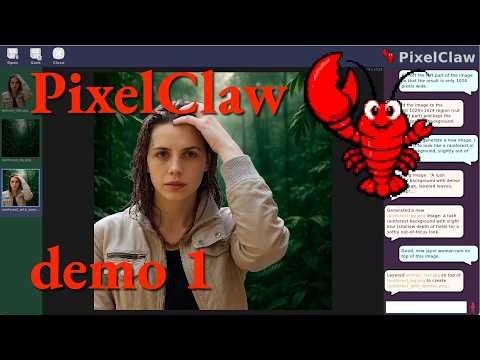
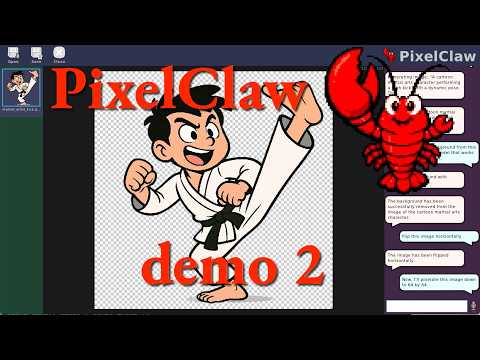
See also the screenshots folder for more screen shots. (Just keep in mind that the app is developing rapidly, so these grow out of date pretty quickly.)
PixelClaw combines:
- an LLM for conversation, planning, and tool use (supports a variety of LLMs)
- image generation/AI-based editing via gpt-image
- background removal via rembg (several specialized models available)
- pixelization using pyxelate
- posterization and defringing using custom algorithms
- speech-to-text (Whisper) and text-to-speech (Kokoro plus HALO)
- a nice UI based on Raylib, including file drag-and-drop
Platform note: PixelClaw is cross-platform, currently tested on macOS and Ubuntu Linux. Windows should work as well.
Prerequisites: Micromamba (or Conda/Mamba).
# 1. Clone the repo
git clone https://github.com/JoeStrout/PixelClaw.git
cd PixelClaw

# 2. Create the environment
micromamba env create -f environment.yml

# 3. Run the app
micromamba run -n pixelclaw python -m pixelclaw.main
On first launch you will be prompted for your OpenAI API key (see below), and some features will download model files the first time they are used (see Runtime Downloads).
Image generation and editing rely on network access to GPT-image-1; by default the agent LLM uses gpt-5.4-mini. Both require an OpenAI API key. This must be stored in either a file called api_key.secret at the project root, or an environment variable called OPENAI_API_KEY.
Some features download large files on first use. Nothing is downloaded until you actually invoke the feature.
| Feature | What | Size | Location |
|---|---|---|---|
| Speech-to-text | Whisper base.en model | ~145 MB | ~/.cache/huggingface/hub/ |
| Text-to-speech | Kokoro-ONNX model + voices | ~300 MB | ~/.cache/kokoro-onnx/ |
| Background removal | rembg model (varies by model choice) | 100–370 MB | ~/.cache/huggingface/hub/ |
| Image generation / editing | GPT-image-1 (OpenAI API) | — | network only |
This project is free and open-source.
Click the ⭐️ at the top of the GitHub page to show us that you're interested. Every star makes the project go faster!
