A beautiful, feature-rich task management application built with React and Supabase. TaskFlow combines powerful productivity features with an intuitive, modern interface to help you stay organized and productive.
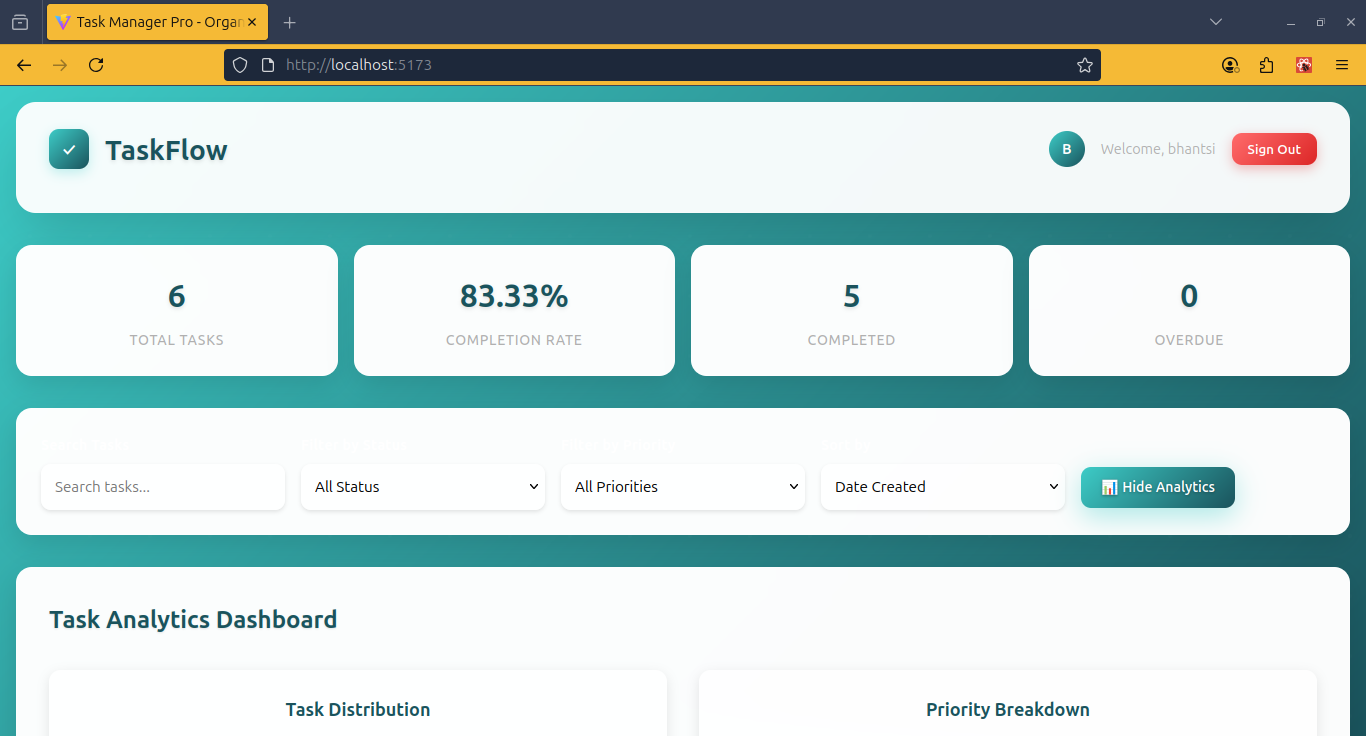
- ✅ Create, edit, and organize tasks with priorities and categories
- 📊 Kanban-style board with To Do, Ongoing, and Done columns
- 🏷️ Smart categorization with color-coded labels
- ⚡ Real-time synchronization across all devices
- 📱 Mobile-responsive design with touch-friendly interface
- 🔒 Secure user authentication with Supabase
- 📧 Email verification and password reset
- 👤 User profiles with customizable preferences
- 🛡️ Row-level security for data protection
- 📊 Productivity dashboard with completion rates
- 📈 Task analytics and performance tracking
- 🎯 Progress visualization with charts and graphs
- 📅 Due date management with overdue indicators
- 🌈 Beautiful teal color scheme (#3DCCC7) with high contrast
- 🌙 Dark mode support with system preference detection
- ✨ Smooth animations and micro-interactions
- 📱 Progressive Web App (PWA) - install on any device
- 🚀 Fast loading with optimized React components
- 💾 Offline support with service worker caching
- 🔄 Real-time updates with Supabase subscriptions
- 📦 Small bundle size with code splitting
- Frontend: React 18, Vite, CSS3
- Backend: Supabase (PostgreSQL, Auth, Real-time)
- Styling: Custom CSS with CSS Variables
- PWA: Service Worker, Web App Manifest
- Deployment: Vercel (auto-deploy from GitHub)
- Node.js 16+ and npm
- Supabase account
git clone https://github.com/yourusername/taskflow.git
cd taskflow
npm install# Copy environment template
cp .env.example .env
# Add your Supabase credentials to .env
VITE_SUPABASE_URL=your_supabase_project_url
VITE_SUPABASE_ANON_KEY=your_supabase_anon_key- Create a new Supabase project
- Run the SQL setup in Supabase SQL Editor:
# Execute the database_setup.sql file in your Supabase dashboardnpm run devVisit http://localhost:5173 to see your TaskFlow app! 🎉
taskflow/
├── public/                 # Static assets and PWA files
│   ├── manifest.json      # PWA manifest
│   └── sw.js             # Service worker
├── src/
│   ├── components/
│   │   ├── Auth.jsx      # Authentication component
│   │   ├── Dashboard.jsx # Main dashboard
│   │   └── ErrorBoundary.jsx # Error handling
│   ├── App.jsx           # Main app component
│   ├── App.css          # Global styles
│   ├── supabaseClient.js # Database client
│   └── main.jsx         # Entry point
├── database_setup.sql    # Database schema and functions
├── .env.example         # Environment variables template
└── README.md           # This file
TaskFlow uses a modern, high-contrast color system:
--primary: #3DCCC7        /* Teal primary */
--primary-dark: #1A535C   /* Dark teal */
--success: #4CAF50        /* Green success */
--warning: #FFC107        /* Amber warning */
--error: #FF6B6B          /* Red error */
--bg: #F8F9FA             /* Light background */
--card: #FFFFFF           /* Card background */
--text: #212529 /* Primary text */TaskFlow works as a Progressive Web App:
- 📲 Install on mobile home screen
- 💾 Offline functionality with cached data
- 🔔 Push notifications (coming soon)
- ⚡ Fast loading with service worker caching
- Connect your GitHub repository to Vercel
- Add environment variables in Vercel dashboard
- Auto-deploy on every push to main branch
# Build for production
npm run build

# Preview build locally
npm run preview

# Deploy dist/ folder to your hosting provider- User profile management with avatars
- Task templates and recurring tasks
- Enhanced analytics dashboard
- Mobile gesture controls
- Team workspaces
- Task sharing and comments
- Real-time collaboration
- User permissions
- Smart task suggestions
- Auto-categorization
- Intelligent notifications
- Productivity insights
See FEATURE_ROADMAP.md for detailed feature plans.
We welcome contributions! Please see our contributing guidelines:
- Fork the repository
- Create a feature branch:
git checkout -b feature/amazing-feature - Commit changes:
git commit -m 'Add amazing feature' - Push to branch:
git push origin feature/amazing-feature - Open a Pull Request
This project is licensed under the MIT License - see the LICENSE file for details.
Made with ❤️ from Kano, Nigeria 🇳🇬
⭐ Star this repo if you find it helpful!