Integration
In your application's solution, right-click on the Solution and use Add \ Existing Project... to add the appropriate .vcxproj file to your solution.
| DirectXTK_Desktop_2026 | Windows desktop applications for Windows 10 or later building with VS 2026 Community, Professional or higher with the latest installed Windows SDK. |
| DirectXTK_Desktop_2022 | Windows desktop applications for Windows 8.1 or later building with VS 2022 Community, Professional or higher with the latest installed Windows SDK. |
| DirectXTK_Desktop_2022_Win10 | Windows desktop applications for Windows 10/Windows 11 building with VS 2022 Community, Professional or higher with the latest installed Windows SDK. Uses XAudio 2.9 and Windows.Gaming.Input
|
| DirectXTK_Windows10_2022 | Universal Windows Platform (UWP) apps building with VS 2022 with the latest installed Windows SDK. |
| DirectXTK_GDK_2022 | Windows 10 and Windows 11 games building with VS 2022 using the Microsoft GDK for x64. |
| DirectXTK_GDKW_2022 | Windows 10 and Windows 11 games building with VS 2022 using the Microsoft GDK for x64 or ARM64. |
For VS 2022, use of the 17.12 is required as all previous versions are no longer supported.
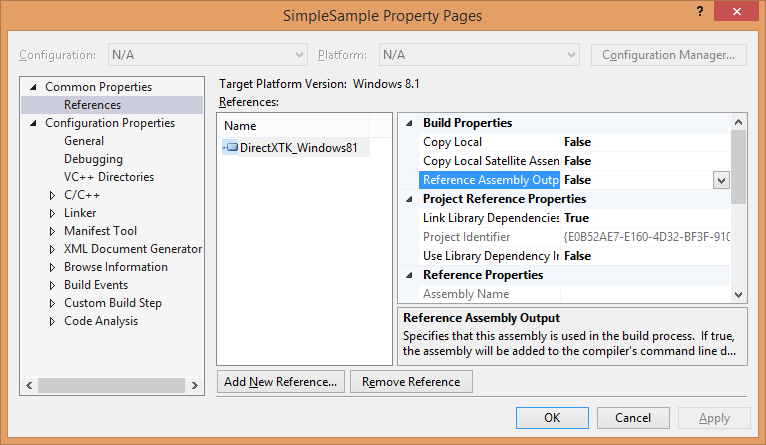
In your application's project, right-click on the Project and use "References...", then "Add New Reference...", and then check the DirectXTK project name and click OK. For a Universal Windows Platform (UWP) app or Xbox One solution, you may need to set Reference Assembly Output to false since DirectXTK is a static C++ library and not a WinRT component.
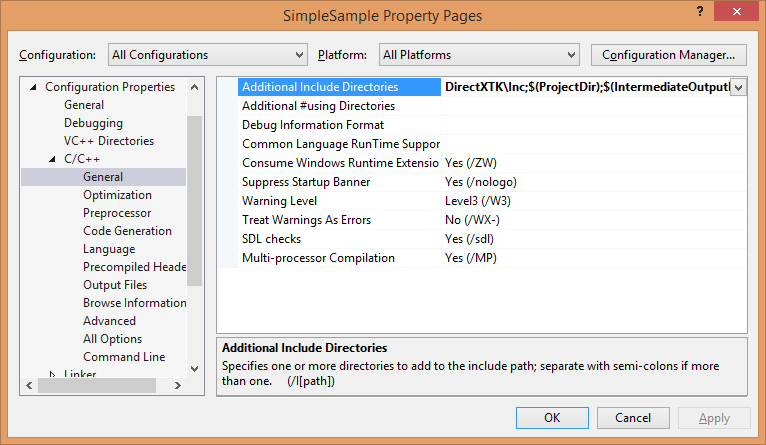
In your application's project settings, on the "C++ / General" page set Configuration to "All Configurations", set Platform to "All Platforms", and then add the relative path to DirectXTK\inc;--assuming you have the DirectXTK folder in the same directory as your sln file, it should be $(SolutionDir)\DirectXTK\inc;--to the Additional Include Directories properties. Click Apply.
See Audio for additional information when setting up Windows desktop projects to use DirectXTK for Audio.
See also the Visual C+ Team Blog
Alternatively you can use NuGet to install one of the DirectX Tool Kit packages. Use Project / Manage NuGet Packages... then select "Online" and search for "DirectXTK".
| directxtk_desktop_win10 | This NuGet is configured for Windows desktop C++ applications building for Windows 10 / Windows 11 with VS 2022 Community/Professional or higher. DirectXTK for Audio in this package uses XAudio 2.9 in the Windows SDK. This packages includes ARM64 binaries. |
| directxtk_uwp | This NuGet is configured for Universal Windows Platform apps for Windows 10 / Windows 11 building with VS 2022 Community/Professional or higher. DirectXTK for Audio in this package uses XAudio 2.9 in the Windows SDK. This packages includes ARM64 binaries. |
You should use the NuGet interface to check for updates if you have an older version installed.
These NuGet packages are no longer supported.
- Windows desktop app using VS 2019
- Windows desktop app using VS 2017
- Windows desktop app using VS 2015
- Windows desktop app using VS 2013
- Windows 8.1 Store
- Windows phone 8.1
- Windows phone 8
The DirectX Tool Kit is also available through the vcpkg C++ Library Manager.
Using 'manifest-mode' is the recommended way to integrate VCPKG into your project.
For 'system-wide' access, use:
vcpkg install directxtk
For the 64-bit version of the library, use:
vcpkg install directxtk:x64-windows
For the Universal Windows Platform (UWP) versions, use:
vcpkg install directxtk:x64-uwp
arm,arm64,arm64ec,x86,x64,windows,windows-static,windows-static-md, anduwptriplets are supported.
Windows Subsystem for Linux (i.e.
arm64-linuxandx64-linux) is not supported.
The vcpkg port supports five optional features. The default is to build without DirectX Tool Kit for Audio support except UWP which always includes it.
-
tools: Installs MakeSpriteFont and xwbtool command-line tools -
spectre: Builds the library with Spectre-mitigation enabled -
xaudio2-8Use XAudio 2.8 for Windows 8.1 or later support -
xaudio2-9Use XAudio 2.9 for Windows 10/Windows 11 -
gameinput: Makes use of GameInput for GamePad, Keyboard, and Mouse. -
xaudio2redistUse the XAudio2Redist for Windows 8.1 or later support
If using vcpkg+MSBuild integration and the DLL versions of the libraries (i.e. not the -static triplets), you will need to manually define the preprocessor symbol
DIRECTX_TOOLKIT_IMPORTor you will get link errors. This is automatically set for CMake integration when using CMake targets.
You can reference the DirectX Tool Kit CMake package using:
find_package(directxtk CONFIG REQUIRED)

target_link_libraries(foo Microsoft::DirectXTK)
If using vcpkg C++ Package Manager, then you add the CMAKE_TOOLCHAIN_FILE path to vcpkg\scripts\buildsystems\vcpkg.cmake. If not using vcpkg, you need to provide a per-configuration path to the installed location in the directxtk_DIR variable. Otherwise the find_package will fail.
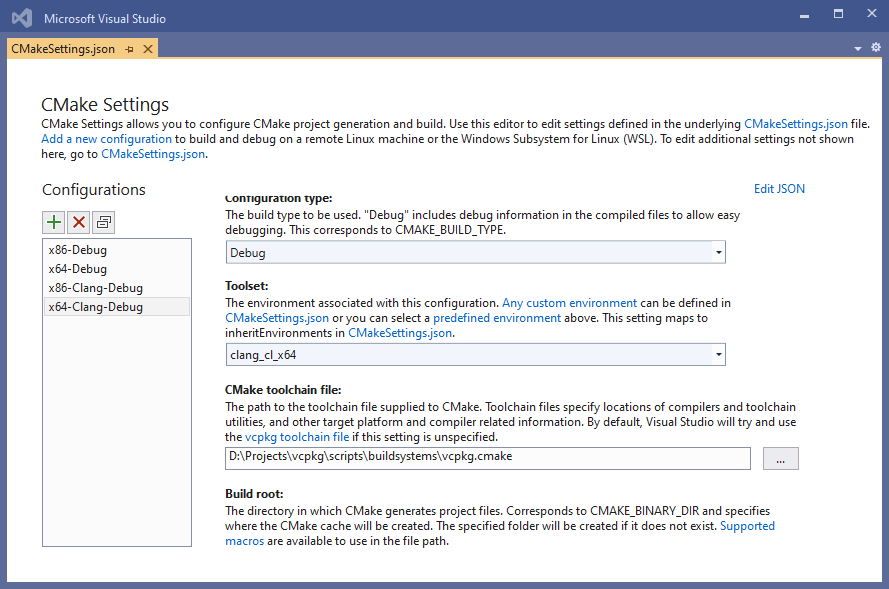
With Visual Studio 2022 Update 6 or later, VCPKG is available via Microsoft.VisualStudio.Component.Vcpkg. Use of 'manifest-mode' is recommended.
There are
CMakePresets.jsonfiles available for the CMake projects on directx-vs-templates that use theVCPKG_ROOTenvironment variable to locate the VCPKG install directory. See the commented out code inCMakeLists.txtas well.