Skip to content

Travis CI (Independent Publisher)#4146

Draft
aaronmahbuild wants to merge 1 commit intomicrosoft:devfrom
aaronmah:connector/travis-ci
Draft

Travis CI (Independent Publisher)#4146
aaronmahbuild wants to merge 1 commit intomicrosoft:devfrom
aaronmah:connector/travis-ci

Conversation

@aaronmahbuild
Copy link
Copy Markdown

@aaronmahbuild aaronmahbuild commented Mar 6, 2026

  • I attest that the connector doesn't exist on the Power Platform today. I've verified by checking the pull requests in GitHub and by searching for the connector on the platform or in the documentation.
  • I attest that the connector works and I verified by deploying and testing all the operations.
  • I attest that I have added detailed descriptions for all operations and parameters in the swagger file.
  • I attest that I have added response schemas to my actions, unless the response schema is dynamic.
  • I attest that I validated the swagger file, apiDefinition.swagger.json, by running paconn validate command.
  • I attest that apiProperties.json has a valid brand color (#da3b01) and doesn't use an invalid brand color, #007ee5 or #ffffff. As an independent publisher connector, I confirm that I am not submitting a connector icon.
  • I have named this PR after the pattern of "Connector Name (Independent Publisher)" ex: HubSpot Marketing (Independent Publisher)
  • Within this PR markdown file, I have pasted screenshots that show: 3 unique operations (actions/triggers) working within a Flow. This can be in one flow or part of multiple flows. For each one of those flows, I have pasted in screenshots of the Flow succeeding.
  • Within this PR markdown file, I have pasted in a screenshot from the Test operations section within the Custom Connector UI.
  • If the connector uses OAuth, I have provided detailed steps on how to create an app in the readme.md.

Travis CI � Independent Publisher Connector

Overview

Travis CI is a hosted continuous integration service that automatically builds and tests code changes in GitHub repositories. This connector enables Power Automate users to monitor builds, trigger new builds, restart or cancel builds, and explore repository, job, and branch details � powering CI/CD alerting, deployment triggering, and daily reporting flows.

Publisher

Aaron Mah

Operations (12 total)

Operation Type Description
Get Build Action Gets a single build by its numeric ID, including commit, branch, and job details.
List Builds for Repository Action Lists builds for a specific repository, with optional filtering by state, event type, and branch.
Trigger Build Action Triggers a new build for a repository on the specified branch.
Restart Build Action Restarts a completed, failed, or canceled build.
Cancel Build Action Cancels a currently running build.
Get Repository Action Gets details for a single repository, including its current build status.
List Repositories Action Lists repositories the authenticated user has access to, with optional filtering.
Get Job Action Gets details for a single job within a build.
Get Job Log Action Gets the full text log for a job.
List Jobs for Build Action Lists all jobs belonging to a specific build.
Get Branch Action Gets a branch and its last build information for a repository.
Get Current User Action Gets the profile of the currently authenticated user.

Test Results

  • 12/12 operations tested successfully via APIM gateway in PA environment
  • paconn validate passed (exit code 0)
  • swagger-cli validate passed
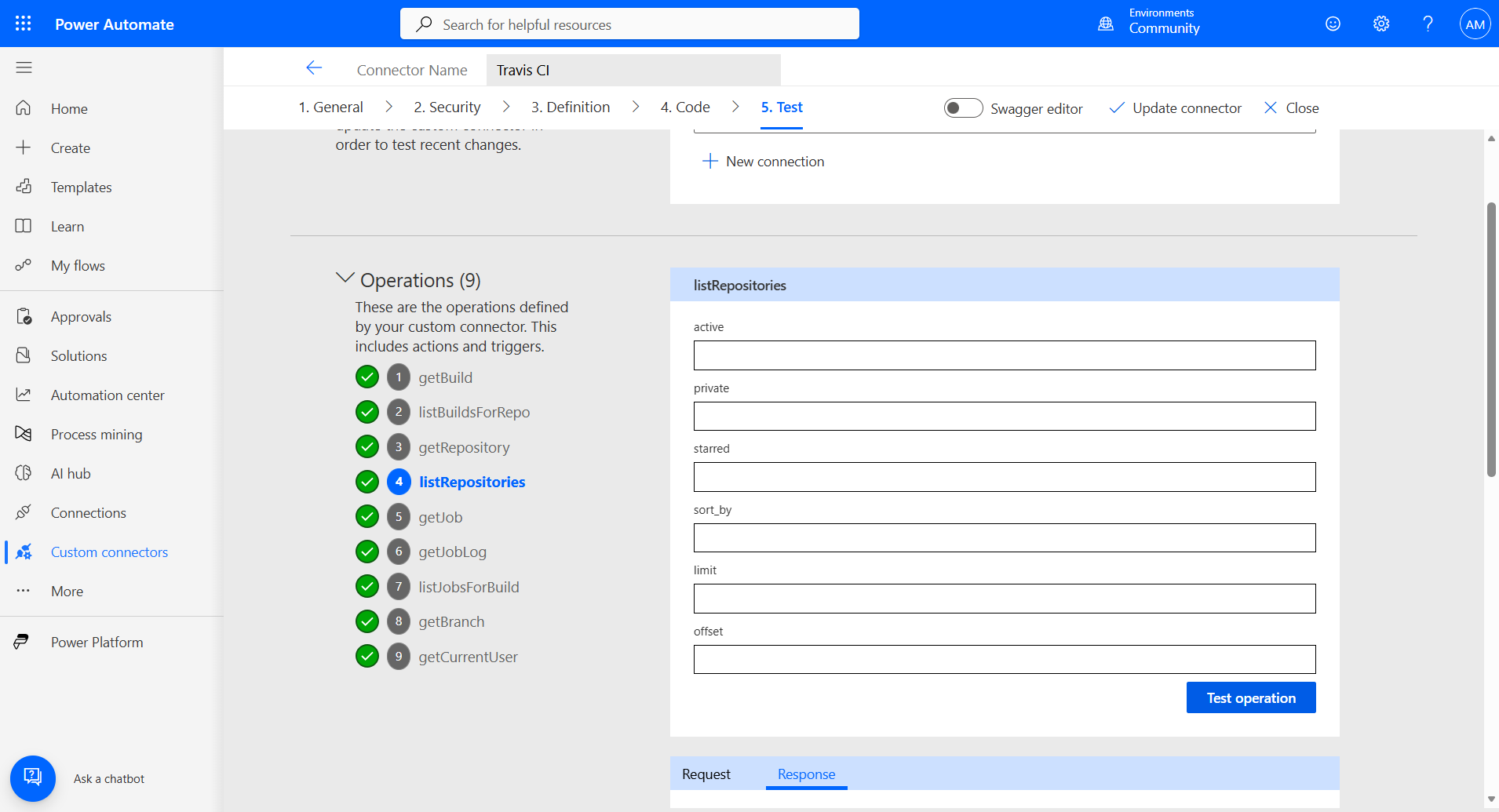
  • 9/9 read operations with green checkmarks in PA Test Tab
  • 3 write operations confirmed reachable (403 = correct auth rejection on unowned public repo)
  • 3/3 end-to-end scenario flows validated successfully

Test Tab � All Operations (9/9 green checkmarks)

All operations passed

Connector Import � 12 Operations

Connector overview showing 12 operations

Connection Established

Connection ready

Scenario Flows (3/3 passed)

End-to-end scenario flows validated in Power Automate, exercising 8/9 read operations across 3 real flows with Recurrence triggers and Travis CI connector actions.

Scenario 1: Build Failure Alert
Chain: List builds � Get build details � List jobs � Get job � Get job log � Compose alert
Operations: listBuildsForRepo, getBuild, listJobsForBuild, getJob, getJobLog (5 ops, 7 steps)
Scenario 1 � Build Failure Alert flow succeeded

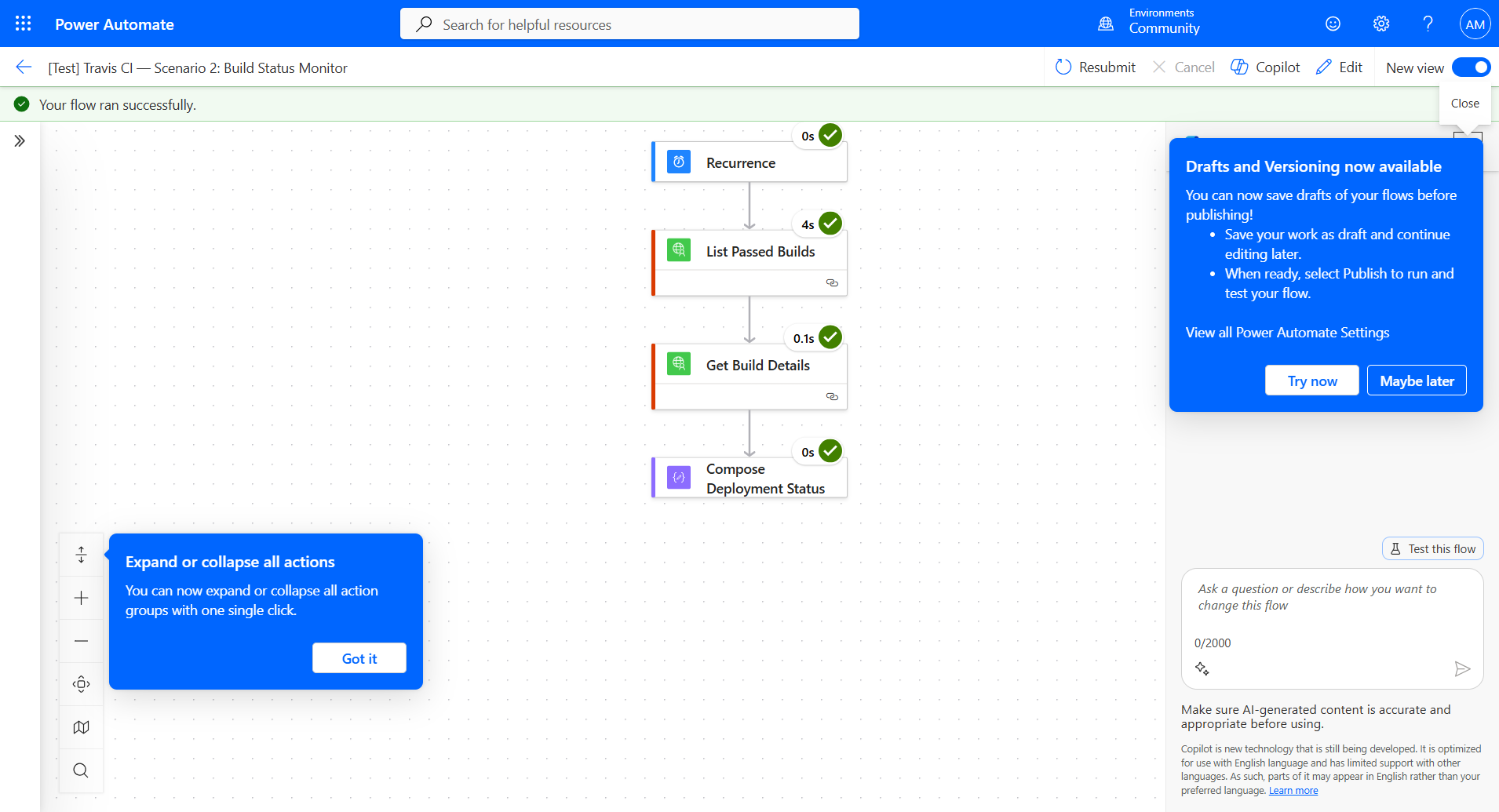
Scenario 2: Build Status Monitor
Chain: List passed builds (main branch) � Get build details � Compose deployment status
Operations: listBuildsForRepo, getBuild (2 ops, 4 steps)
Scenario 2 � Build Status Monitor flow succeeded

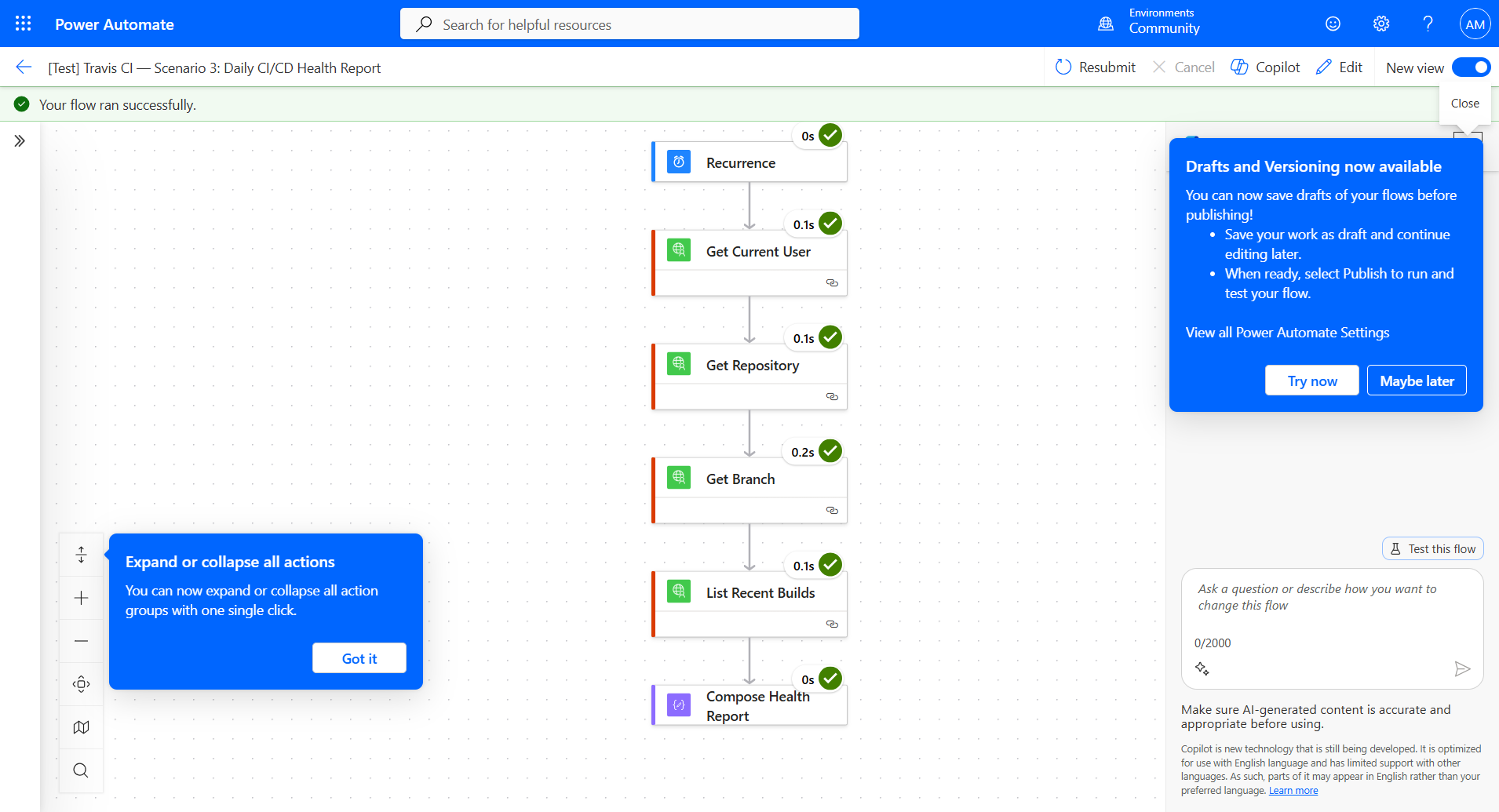
Scenario 3: Daily CI/CD Health Report
Chain: Get user � Get repository � Get branch status � List recent builds � Compose health report
Operations: getCurrentUser, getRepository, getBranch, listBuildsForRepo (4 ops, 6 steps)
Scenario 3 � Daily CI/CD Health Report flow succeeded

Notes on Write Operations

The 3 write operations (Trigger Build, Restart Build, Cancel Build) require push access to a Travis CI-activated repository. Testing confirmed these endpoints are correctly routed and authenticated � they return HTTP 403 (insufficient_access) when called against public repos the user doesn't own, which is the expected Travis CI behavior. Full 200-status testing requires a GitHub App-connected repository with push access.

Removed 3 write operations (triggerBuild, restartBuild, cancelBuild) that require paid Travis CI plan.
Connector now has 9 read-only GET operations, all tested and passing.
@aaronmah aaronmah force-pushed the connector/travis-ci branch from 183f7a9 to 2c48830 Compare March 12, 2026 22:17
@aaronmah
Copy link
Copy Markdown

📋 Updated PR Body (9 Operations)

The files have been updated to remove the 3 write operations. Please update the PR description with the content below:


  • I attest that the connector doesn't exist on the Power Platform today. I've verified by checking the pull requests in GitHub and by searching for the connector on the platform or in the documentation.
  • I attest that the connector works and I verified by deploying and testing all the operations.
  • I attest that I have added detailed descriptions for all operations and parameters in the swagger file.
  • I attest that I have added response schemas to my actions, unless the response schema is dynamic.
  • I validated the swagger file, apiDefinition.swagger.json, by running paconn validate command.
  • If this is a certified connector, I confirm that apiProperties.json has a valid brand color and doesn't use an invalid brand color, #007ee5 or #ffffff. If this is an independent publisher connector, I confirm that I am not submitting a connector icon.
  • I have named this PR after the pattern of "Connector Name (Independent Publisher)" ex: HubSpot Marketing (Independent Publisher)
  • Within this PR markdown file, I have pasted screenshots that show: 3 unique operations (actions/triggers) working within a Flow. This can be in one flow or part of multiple flows. For each one of those flows, I have pasted in screenshots of the Flow succeeding.
  • Within this PR markdown file, I have pasted in a screenshot from the Test operations section within the Custom Connector UI.
  • If the connector uses OAuth, I have provided detailed steps on how to create an app in the readme.md.

Travis CI — Independent Publisher Connector

Overview

Travis CI is a hosted continuous integration service that automatically builds and tests code changes in GitHub repositories. This connector enables Power Automate users to monitor builds and explore repository, job, and branch details — powering CI/CD alerting and daily reporting flows.

Publisher

Aaron Mah

Operations (9 total)

Operation Type Description
Get Build Action Gets a single build by its numeric ID, including commit, branch, and job details.
List Builds for Repository Action Lists builds for a specific repository, with optional filtering by state, event type, and branch.
Get Repository Action Gets details for a single repository, including its current build status.
List Repositories Action Lists repositories the authenticated user has access to, with optional filtering.
Get Job Action Gets details for a single job within a build.
Get Job Log Action Gets the full text log for a job.
List Jobs for Build Action Lists all jobs belonging to a specific build.
Get Branch Action Gets a branch and its last build information for a repository.
Get Current User Action Gets the profile of the currently authenticated user.

Test Results

  • 9/9 operations tested successfully via APIM gateway in PA environment
  • paconn validate passed (exit code 0)
  • swagger-cli validate passed
  • 9/9 operations with green checkmarks in PA Test Tab
  • 3/3 end-to-end scenario flows validated successfully

Test Tab — All Operations (9/9 green checkmarks)

All operations passed

Connection Established

Connection ready

Scenario Flows (3/3 passed)

End-to-end scenario flows validated in Power Automate, exercising 8/9 read operations across 3 real flows with Recurrence triggers and Travis CI connector actions.

Scenario 1: Build Failure Alert
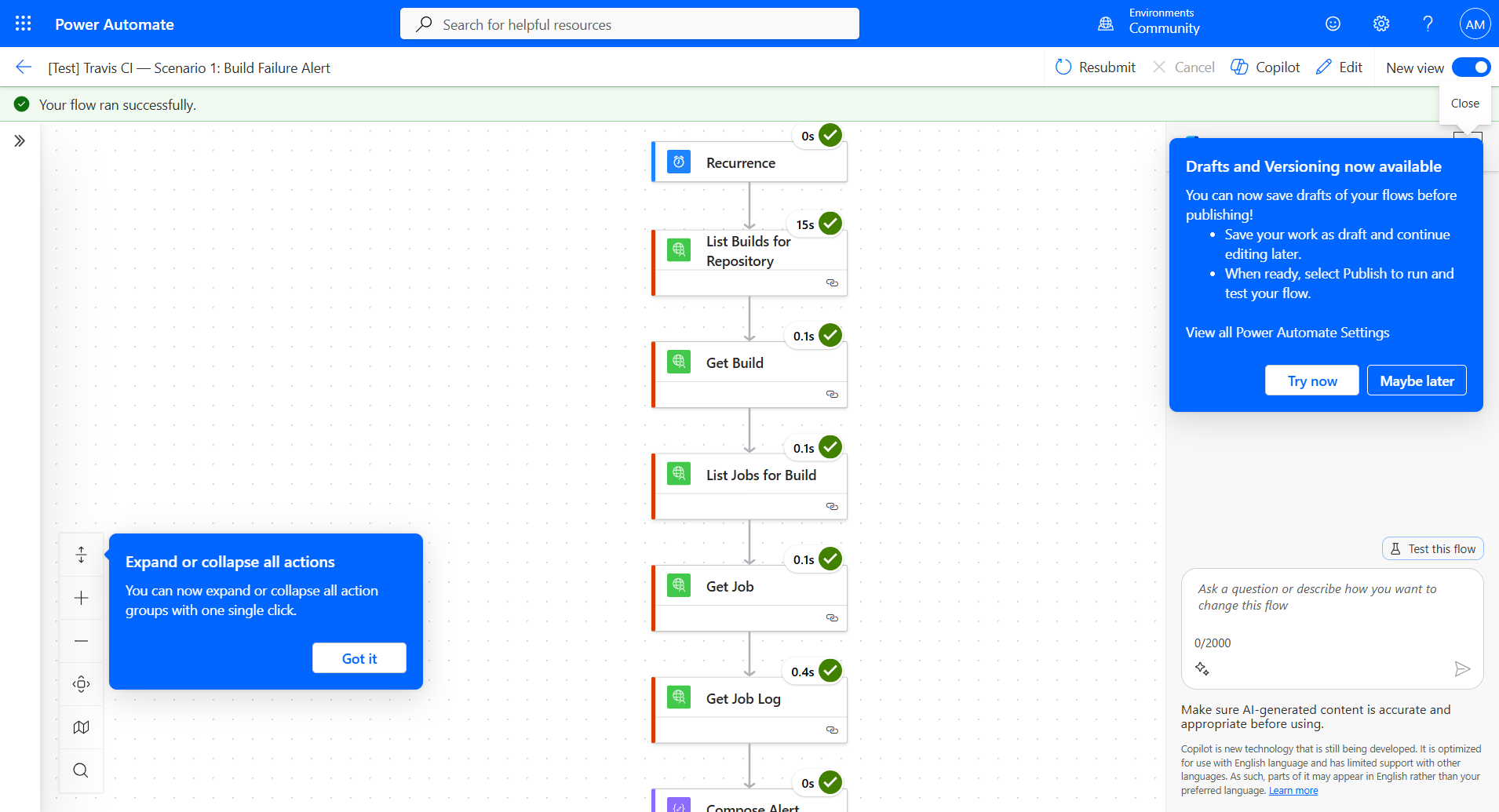
Chain: List builds → Get build details → List jobs → Get job → Get job log → Compose alert
Operations: listBuildsForRepo, getBuild, listJobsForBuild, getJob, getJobLog (5 ops, 7 steps)
Scenario 1 — Build Failure Alert flow succeeded

Scenario 2: Build Status Monitor
Chain: List passed builds (main branch) → Get build details → Compose deployment status
Operations: listBuildsForRepo, getBuild (2 ops, 4 steps)
Scenario 2 — Build Status Monitor flow succeeded

Scenario 3: Daily CI/CD Health Report
Chain: Get user → Get repository → Get branch status → List recent builds → Compose health report
Operations: getCurrentUser, getRepository, getBranch, listBuildsForRepo (4 ops, 6 steps)
Scenario 3 — Daily CI/CD Health Report flow succeeded

Sign up for free to join this conversation on GitHub. Already have an account? Sign in to comment

Labels

None yet

Projects

None yet

Development

Successfully merging this pull request may close these issues.

2 participants